Apache Spark Streaming - Listen to a local streaming data (NETCAT) using PySpark
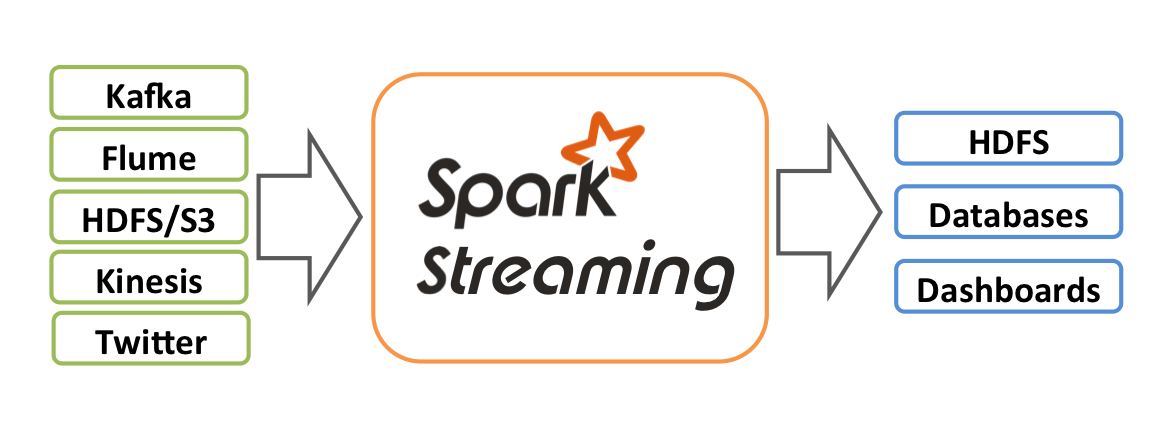
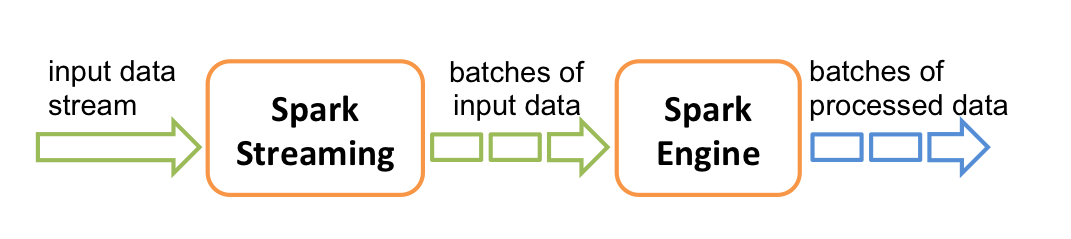
Spark Streaming is an extension of the core Spark API that enables scalable, high-throughput,
fault-tolerant stream processing of live data streams. Data can be ingested from many sources
like Kafka, Flume, Kinesis, or TCP sockets, and can be processed using complex
algorithms expressed with high-level functions like
In the below example,I have explained how to read a streaming log file using PySpark with an interval of 10 seconds(batch process value).
map, reduce, join and window.
Finally, processed data can be pushed out to filesystems, databases,
and live dashboards.In the below example,I have explained how to read a streaming log file using PySpark with an interval of 10 seconds(batch process value).
I have used NETCAT for listening TCP socket(localhost 9999) in the below example.
Download NETCAT for windows:
https://joncraton.org/blog/46/netcat-for-windows/
Start netcat using below command:
nc -l -p 9999
Stream1.py
import sys
from pyspark import SparkContext
from pyspark.streaming import StreamingContext
if __name__ == '__main__':
sc=SparkContext(master="local[2]",appName="FindWords")
ssc=StreamingContext(sc,10)
ssc.checkpoint("C:/Users/thakudev/PYTHON/SparkStream/myStream")
lines=ssc.socketTextStream(sys.argv[1], int(sys.argv[2]))
counts=lines.flatMap(lambda line:line.split(" "))\
.filter(lambda word:"Exception" in word)\
.map(lambda word:(word,1))\
.reduceByKey(lambda a,b:a+b)
counts.pprint()
ssc.start()
ssc.awaitTermination()
|
Run in Eclipse with Arguments as localhost 9999
Type some keyword in netcat console
Like
Hello
Exception
Exception Exception
Output:
19/04/22 09:20:06 WARN NativeCodeLoader: Unable to load
native-hadoop library for your platform... using builtin-java classes where
applicable
Using Spark's default log4j profile: org/apache/spark/log4j-defaults.properties
Setting default log level to "WARN".
To adjust logging level use sc.setLogLevel(newLevel). For SparkR,
use setLogLevel(newLevel).
[Stage 0:>
(0 + 1) / 1]19/04/22 09:20:10 WARN RandomBlockReplicationPolicy:
Expecting 1 replicas with only 0 peer/s.
19/04/22 09:20:10 WARN BlockManager: Block input-0-1555905010600
replicated to only 0 peer(s) instead of 1 peers
[Stage 0:>
(0 + 1) / 1][Stage 2:> (0 + 1) / 1]
[Stage 0:>
(0 + 1) / 1][Stage 4:> (0 + 1) / 1]
-------------------------------------------
Time: 2019-04-22 09:20:10
-------------------------------------------
[Stage 0:>
(0 + 1) / 1]19/04/22 09:20:14 WARN RandomBlockReplicationPolicy:
Expecting 1 replicas with only 0 peer/s.
19/04/22 09:20:14 WARN BlockManager: Block input-0-1555905014200
replicated to only 0 peer(s) instead of 1 peers
[Stage 0:>
(0 + 1) / 1][Stage 5:> (0 + 1) / 2]
[Stage 0:>
(0 + 1) / 1][Stage 5:=========> (1 + 1) / 2]19/04/22 09:20:21 WARN
RandomBlockReplicationPolicy: Expecting 1 replicas with only 0 peer/s.
19/04/22 09:20:21 WARN BlockManager: Block input-0-1555905021000
replicated to only 0 peer(s) instead of 1 peers
[Stage 0:>
(0 + 1) / 1]
[Stage 0:>
(0 + 1) / 1][Stage 6:> (0 + 1) / 1]
[Stage 0:>
(0 + 1) / 1][Stage 8:> (0 + 1) / 1]
-------------------------------------------
Time: 2019-04-22 09:20:20
-------------------------------------------
('Exception', 1)
[Stage 0:> (0 + 1) / 1]
[Stage 0:>
(0 + 1) / 1][Stage 9:> (0 + 1) / 1]
[Stage 0:>
(0 + 1) / 1]
[Stage 0:>
(0 + 1) / 1][Stage 10:> (0 + 1) / 1]
[Stage 0:>
(0 + 1) / 1][Stage 12:> (0 + 1) / 1]
-------------------------------------------
Time: 2019-04-22 09:20:30
-------------------------------------------
('Exception', 2)
[Stage 0:>
(0 + 1) / 1]
|
Feel Free to contact me in case you have any questions.


 Posts
Posts


Nice and good article. It is very useful for me to learn and understand easily. Thanks for sharing your valuable information and time. Please keep updating big data online training
ReplyDeleteSuch sites are important because they provide a large dose of useful information ... data entry appraisal
ReplyDeletevery nice blog.
ReplyDeleteThis blog is really awesome one.
keep sharing more posts.
big data and hadoop online training
Actually I read it yesterday but I had some thoughts about it and today I wanted to read it again because it is very well written. Film streaming
ReplyDeletecorrectly written serve. it will likely be worthwhile to anyone who makes use of it, counting me. maintain taking location the amenable produce an effect. For certain i can overview out more posts morning in and morning out. https://totalsportek.news/f1-streaming
ReplyDelete