JAVA COLLECTIONS
The Collection in Java is a framework that provides an architecture to store and manipulate the group of objects.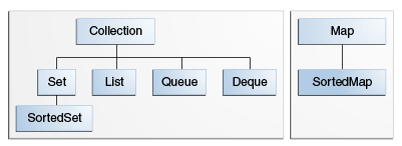
The core collection interfaces.
All the operations that you perform on a data such as searching, sorting, insertion, manipulation, deletion, etc. can be achieved by Java Collections.
Java Collection means a single unit of objects. Java Collection framework provides many interfaces (Set, List, Queue, Deque, etc.) and classes (ArrayList, Vector, LinkedList, PriorityQueue, HashSet, LinkedHashSet, TreeSet, etc.).
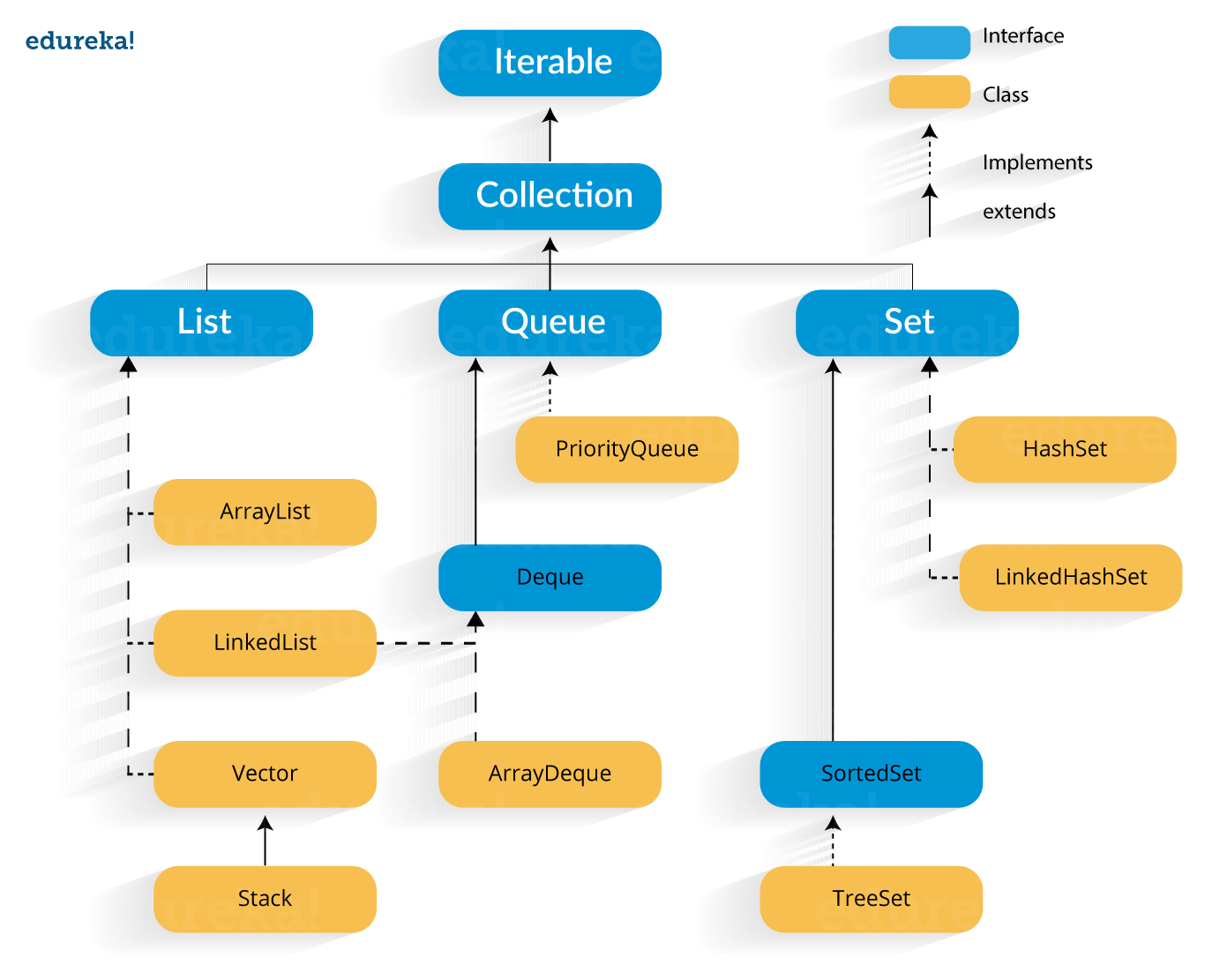
A Java collection framework includes the following:
- Interfaces
- Classes
- Algorithm
Iterator interface:
Iterator interface provides the facility of iterating the elements in a forward direction only and modify the elements.Iterator interface has three methods which are mentioned below:
- public boolean hasNext() – This method returns true if iterator has more elements.
- public object next() – It returns the element and moves the cursor pointer to the next element.
- public void remove() – This method removes the last elements returned by the iterator.
Collection Interface:
The Collection interface is the interface which is implemented by all the classes in the collection framework. It declares the methods that every collection will have.Some of the methods of Collection interface are Boolean add ( Object obj), Boolean addAll ( Collection c), void clear(), etc. which are implemented by all the subclasses of Collection interface.
List Interface:
A List is an ordered Collection of elements which may contain duplicates. It is an interface that extents the Collection interface. Lists are further classified into the following:- ArrayList
- LinkedList
- Vectors
To instantiate the List interface, we must use :
- List <data-type> list1= new ArrayList();
- List <data-type> list2 = new LinkedList();
- List <data-type> list3 = new Vector();
- List <data-type> list4 = new Stack();
ArrayList:
ArrayList is the implementation of List Interface where the elements can be dynamically added or removed from the list. Also, the size of the list is increased dynamically if the elements are added more than the initial size.The ArrayList class maintains the insertion order and is non-synchronized.
Example1:
package
com.dev.praticecollection;
import
java.util.ArrayList;
import java.util.Iterator;
public class TestArrayList {
public static
void main(String[] args) {
ArrayList<String>
list = new ArrayList<String>();
list.add("RAM");
list.add("Ganesh");
list.add("Ganesh");
list.add("Urvashi");
System.out.println("Output:");
//
traversing list
Iterator<String>
itr = list.iterator();
while
(itr.hasNext()) {
System.out.println(itr.next());
}
}
}
Output:
RAM
Ganesh
Ganesh
Urvashi
|
Examle 2: Make an ArrayList immutable
package com.dev.praticecollection;
import java.util.ArrayList;
import java.util.Arrays;
import java.util.List;
public final class ListUtil {
private final List<String> list = new ArrayList<String>();
public ListUtil() {
list.add("A");
list.add("B");
}
public List<String>
getImmutableList() {
List<String>
finalList = new ArrayList<String>();
list.forEach(s -> finalList.add(s));
return finalList;
}
public static void main(String[] args) {
ListUtil obj = new ListUtil();
System.out.println("Immutable list" + obj.getImmutableList());
obj.getImmutableList().add("C");
System.out.println("After adding Immutable list" + obj.getImmutableList());
}
}
Output:
Immutable list[A, B]
After adding Immutable list[A, B]
|
LinkedList
LinkedList is a Doubly-linked list implementation of theList and Deque
interfaces. Implements all optional list operations, and permits all
elements (including null).- Every element is a node, which keeps a reference to the next and previous ones
- It maintains insertion order
- It can store the duplicate elements.
Although LinkedList is not synchronized, we can retrieve a synchronized version of it by calling the Collections.synchronizedList method, like:
List list = Collections.synchronizedList(new LinkedList(...));The insertion, addition and removal operations of an item are faster in a LinkedList because there is no need to resize an array or update the index.A LinkedList consumes more memory than an ArrayList because of every node in a LinkedList stores two references, one for its previous element and one for its next element, whereas ArrayList holds only data and its index.
ArrayList is usually the default List implementation.
However, there are certain use cases where using LinkedList will be a better fit, such as preferences for constant insertion/deletion time (e.g., frequent insertions/deletions/updates), over constant access time and effective memory usage.
However, there are certain use cases where using LinkedList will be a better fit, such as preferences for constant insertion/deletion time (e.g., frequent insertions/deletions/updates), over constant access time and effective memory usage.
Algorithm           ArrayList   LinkedList
seek front            O(1)         O(1)
seek back             O(1)         O(1)
seek to index         O(1)         O(N)
insert at front       O(N)         O(1)
insert at back        O(1)         O(1)
insert after an item  O(N)         O(1)
ArrayLists are good for write-once-read-many or appenders, but bad at add/remove from the front or middle. LinkedList uses lots of small memory objects, and therefore impacts performance across the process.Lots of small objects are bad for cache-locality.


 Posts
Posts


0 comments:
Post a Comment